
AutoCAD set lineweight to ByLayer – clean all lineweights in the DWG
This module performs an AutoCAD set lineweight to ByLayer update on the entire drawing.
It scans Model Space, Paper Space layouts and block definitions, then removes any local lineweight
override. As a result, all entities follow the layer settings, ensuring clean printing and stable
CAD standards across your project.
This is especially helpful when drawings come from different teams or subcontractors and contain
inconsistent lineweight rules. If you want to standardize your whole project, you can also visit
our page listing all AutoCAD productivity tools. For more technical
details about lineweights, you may check the
official Autodesk documentation
.
How to run AutoCAD set lineweight to ByLayer
Open the DWG
First, the software opens the DWG to be processed. There is no preparation required on your side.

Loading the drawing to normalize. Scan the entire drawing
Next, the tool scans all areas of the DWG: Model Space, Paper Space layouts and block definitions.
This ensures complete control without missing hidden lineweight overrides.Global analysis of all entities in the DWG. Apply ByLayer lineweight
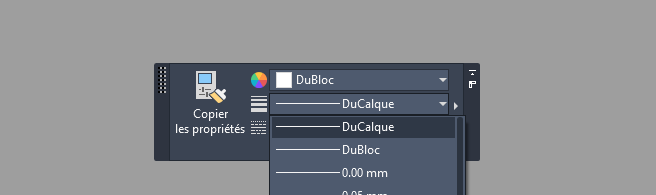
Then, the plugin forces all lineweights to ByLayer. This action removes any local
overrides and ensures a uniform lineweight behavior. Thus, printing becomes predictable and
easier to control.Unified lineweight control across the entire drawing. No visual change
The geometry, colors and layers remain unchanged. Only the lineweight behavior is cleaned.
This makes your drawing more consistent without altering its appearance.The appearance stays the same; control becomes standardized. Save the DWG
Finally, the DWG is saved with clean lineweight settings. As a result, your project follows
proper CAD standards and remains easy to print across different teams and software versions.Drawing saved with clean layer-based lineweight.

Why use AutoCAD set lineweight to ByLayer?
Running an AutoCAD set lineweight to ByLayer cleanup removes inconsistencies, improves
print reliability and ensures the DWG respects corporate CAD standards. It also avoids errors when
exporting to PDF or sharing the file with external partners.