Goal:
Identify the next sheet number
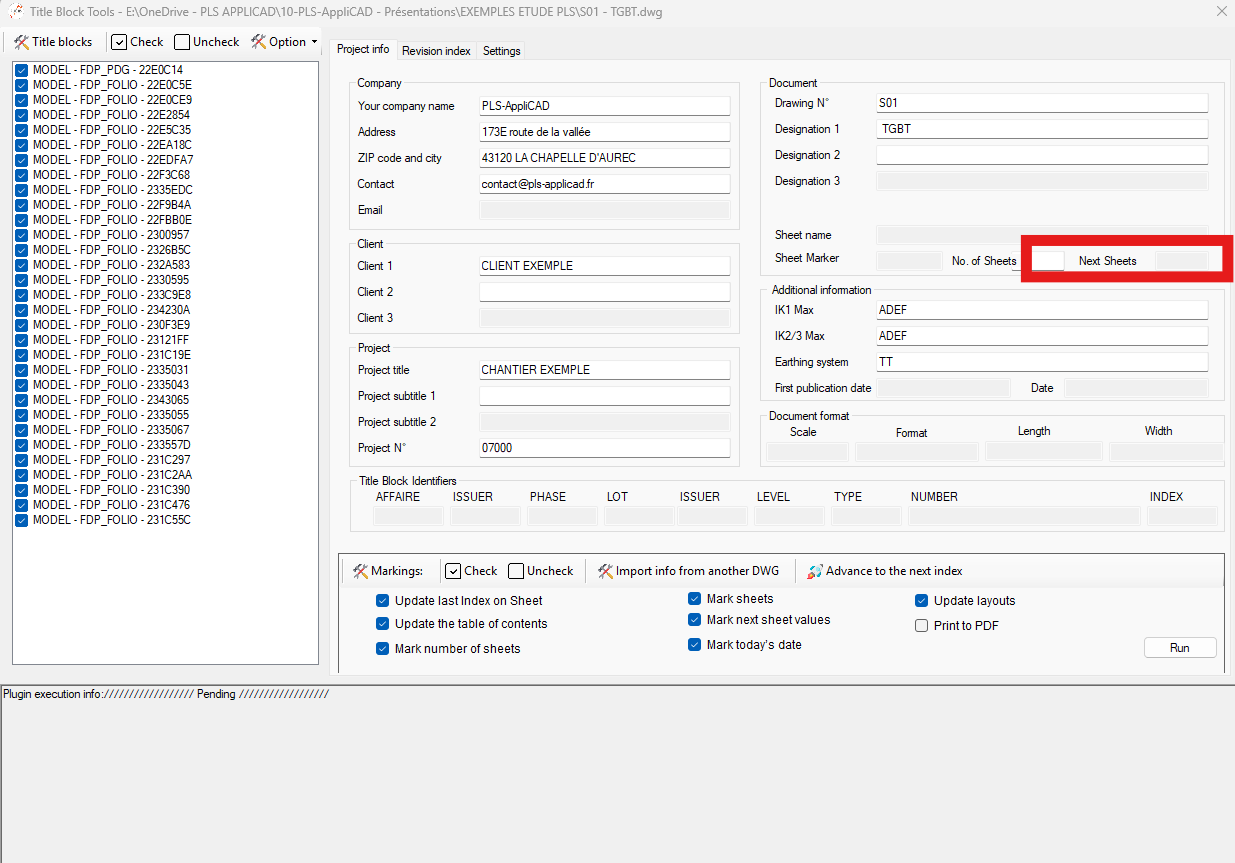
It opens each DWG, detects which sheet comes next in the sequence, and writes this result into the Next Sheet field.
The file is saved and the process continues with the following DWG.
This creates a smooth, logical navigation from one sheet to the next throughout the whole project.
By automating the next-sheet numbering, you avoid manual checks and reduce mistakes.
It is especially useful for large projects where the sheet order changes often.
You gain time, and every title block stays synchronized with the real project sequence.
This function is part of a wider set of tools designed to improve AutoCAD productivity.
You can explore other features on our AutoCAD plugins page.
Opening DWGs one by one
The software opens each DWG in your list in sequence.
This method keeps the workflow stable and avoids unnecessary system load.
Each DWG is opened and processed individually. Filling the “Next Sheet” field
The module identifies the next sheet in the order.
It then writes this value in the Next Sheet field of the title block.
Each sheet becomes linked to the sheet that follows it.The continuity link sheet → next sheet is created automatically. Save and move to the next DWG
When all fields are updated, the DWG is saved.
The software then loads the next file and repeats the same process.
At the end, all sheets show accurate “Next Sheet” information.Each DWG is saved before processing the next one.