Goal: AutoCAD revision update – Update latest Revision Index on sheets
It performs an automatic scan of all drawings, retrieves the most recent revision used, and writes this value into the INDICE field of each title block.
Using this AutoCAD revision update workflow avoids mistakes, maintains consistency across your documentation, and saves time compared to manual updates.
You can also discover related automation tools on our
AutoCAD plugins page and learn more about DWG concepts in the
official Autodesk documentation.
When working on multi-sheet DWG projects, maintaining consistent revision indexes is essential.
If one sheet is updated but others remain unchanged, confusion can occur during printing, client reviews, or project delivery.
This AutoCAD revision update feature eliminates that risk by harmonizing the revision index across all drawings, ensuring
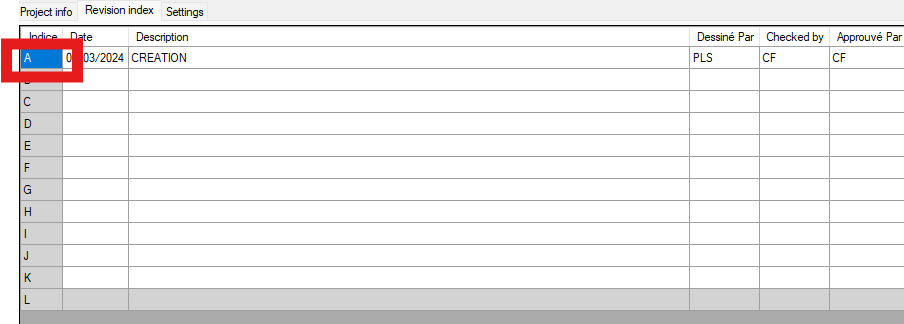
that the latest version is visible everywhere. The tool processes each DWG one by one, analyzes the revision history (A…L),
detects the most recent value, and writes it automatically into all sheets.
It is especially useful when large teams collaborate and revisions are created frequently.
This module is part of a wider range of productivity tools for AutoCAD, including sheet management, project tagging,
and batch processing. You can also explore features such as automatic sheet numbering or project-wide updates
on our tagging tools section. These tools help keep your drawings consistent and reduce repetitive work.
AutoCAD revision update – DWG-by-DWG processing
The software opens each DWG individually and applies the AutoCAD revision update routine.
This prevents system overload and ensures a reliable workflow for large folders.
Each DWG is processed individually. Updating the revision index on every sheet
The module analyzes the revision sequence, extracts the latest revision used, and writes this value into the INDICE field
in every sheet. This AutoCAD revision update ensures perfect alignment across the entire project.The correct revision index is applied to all sheets. Save and continue to the next DWG
Once updated, the DWG is saved and the software automatically moves to the next drawing.
At the end of the process, all files show a consistent revision index.Each DWG is updated, saved, and processed in sequence.