
AutoCAD update table of contents – automatic summary update
This tool performs an AutoCAD update table of contents across all drawings in your list.
It opens each DWG, detects the standard Summary block used by the application, fills it automatically
with the correct project information, then saves the updated file.
Thanks to this automation, you no longer need to edit summaries manually.
Furthermore, the result is consistent across all sheets of the project.
How the AutoCAD update table of contents tool works
Sequential opening of DWGs
The software processes each file individually. As soon as one DWG is finished,
the next one is automatically loaded. This ensures a clean and predictable workflow.
Each drawing is loaded in sequence. Detecting and filling the Summary block
Next, the module executes the “Detect Summaries” routine.
It identifies the dedicated Summary block provided in the template DWG,
then completes the fields with the correct project data.
As a result, every sheet receives a consistent and up-to-date table of contents.The Summary block is updated automatically. Save and continue
After the update is applied, the DWG is saved.
Immediately afterward, the software moves on to the next file
and repeats the full process. Consequently, you obtain a complete set
of drawings with updated tables of contents.Each file is updated, saved, and the next one begins.

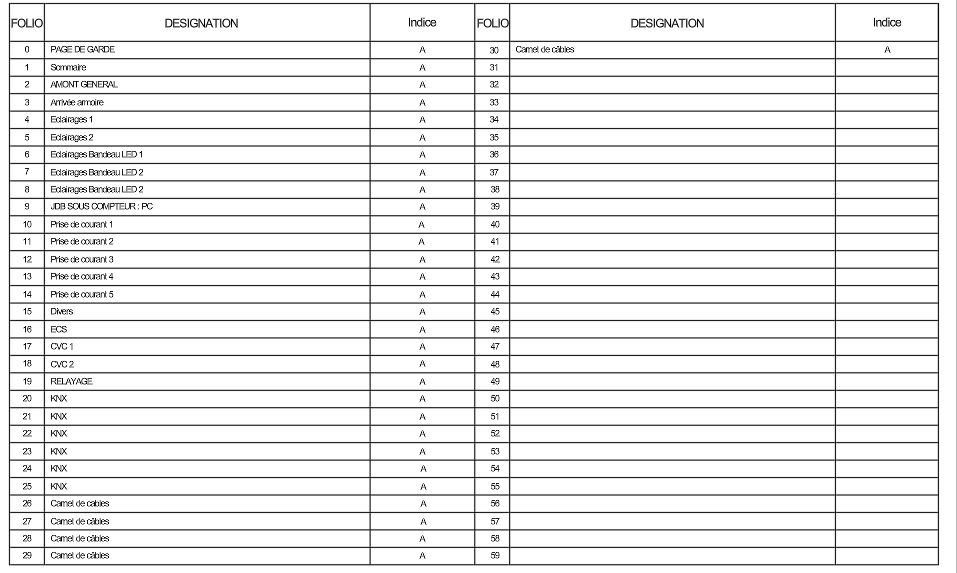

Why use this AutoCAD summary update tool?
Using an automated AutoCAD update table of contents ensures accuracy,
prevents manual mistakes, and drastically speeds up project preparation.
It is especially useful for large drawing sets or projects requiring frequent revisions.