
AutoCAD text Excel – export Model Space text
This tool extracts all text present in the DWG’s Model Space (TEXT, MTEXT, annotations, technical labels, etc.)
and prepares it for use in Excel. It retrieves the content, position, style and layer for each text object,
then builds a table that you can review, correct and reuse for your project.
It is ideal for quality reviews, as-built documentation (DOE), validation of technical labels or safety standards.
You can combine this export with other productivity tools from our
AutoCAD plugins collection
to automate checks on your drawings. For more details on text and annotation objects,
the
official Autodesk documentation
provides additional background and best practices.
How to export Model Space text to Excel
Scan the entire Model Space
The software scans the entire Model Space of the current DWG. There is no need to manually select
area by area: the whole Model Space is processed in one operation, which guarantees that no text
is forgotten.
Global reading of Model Space. Detect all text objects
All text entities (TEXT, MTEXT and similar objects) are detected and listed.
This includes technical notes, labels, room names, equipment tags and any other textual information
placed in Model Space.All textual content in the drawing is inventoried. Prepare key information for each text
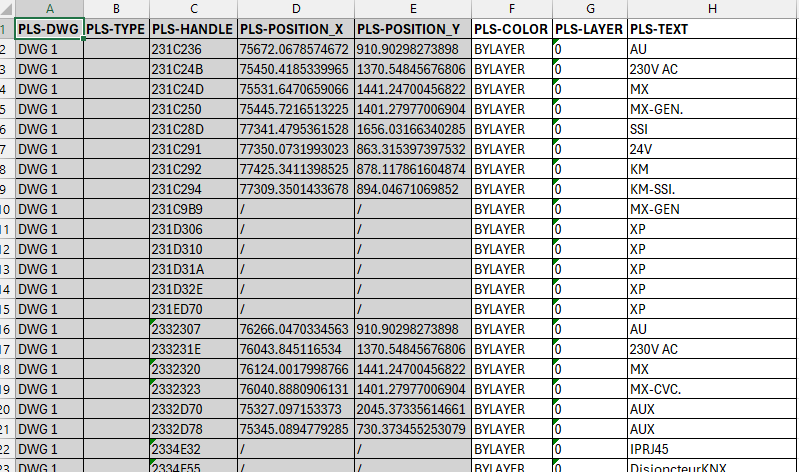
For every text found, the tool gathers the main technical information into a table, including:
- text content,
- layer (Layer),
- text style,
- position in the DWG.
These data are displayed in a summary table that you can adjust before exporting to Excel:
you can hide non-relevant lines, correct obvious errors or add comments for later checks.View and correct entries before exporting to Excel. Export the text table to Excel
Once the information is validated, the final table is exported to Excel.
You can then:- run a spell-check on all notes and labels,
- verify consistency of technical notes and naming conventions,
- archive the drawing state for client or quality approval.
This Excel file becomes your reference dataset for text, very useful for audits,
DOE documentation and project follow-up.A clean Excel file, ready for review, archiving or reimport.


Benefits of using Excel for text control
By centralizing all drawing text in Excel, you can quickly identify missing information,
inconsistent wording or non-compliant labels. It becomes easier to align your drawings
with project standards and client requirements. This
AutoCAD text Excel workflow helps reduce manual checks inside the DWG,
improves traceability of changes and saves time on quality reviews.