Purpose:
Export text from Paper Space to Excel (AutoCAD)
It is ideal when preparing documentation, as-built records (DOE), compliance reviews, and proofreading workflows. By exporting Paper Space text to Excel,
you can check spelling, validate corporate wording, ensure consistency, and re-import updated content if required.
This feature is particularly helpful for projects with many layouts, where manually reviewing text on each tab is time-consuming.
Exporting text from Paper Space to Excel allows you to centralize information into a structured table and quickly identify mistakes or outdated content.
It also improves traceability by offering a clear snapshot of the textual state of your drawings at a specific moment.
For additional productivity tools, you can explore our
AutoCAD plugins page or consult the
official Autodesk documentation
to learn more about DWG concepts and Paper Space management.
Traverse Paper Spaces
The software loops through all layouts (Paper Space tabs) of the current DWG and detects every visible text element for export.

Each layout is inspected to capture all text. Collect text objects
The tool gathers all text entities such as TEXT, MTEXT, notes, titles, and annotations. Each element is logged with context information.
All text from the layouts is collected and listed. Prepare structured data for Excel
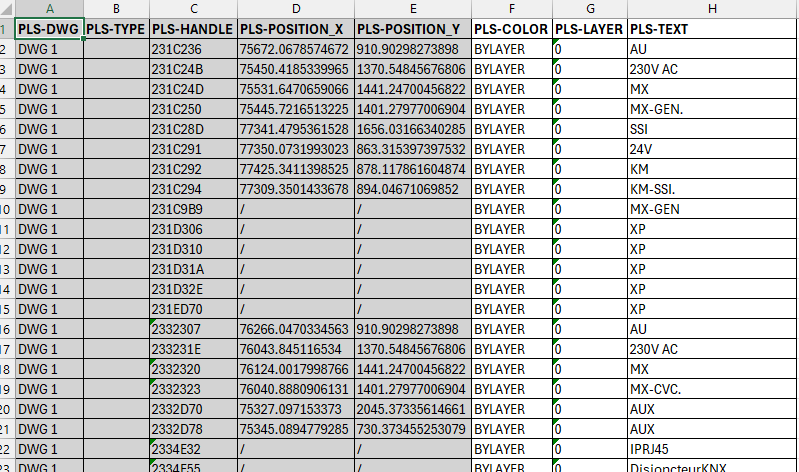
For each detected text object, the module records:
- the text content,
- the layer,
- the text style,
- the layout from which it comes.
This structured export makes it easier to review, clean, or standardize project information.
Each Excel row represents one text found in Paper Space. Export to Excel for review and corrections
The Excel file is generated automatically. You can then:
- check spelling and wording,
- validate compliance with norms or safety labels,
- archive project state for DOE documentation,
- prepare updates before re-importing changes into the DWG.