
AutoCAD force font to Arial – update all text styles
This module lets you force all text fonts to Arial in AutoCAD.
It updates every text style in the DWG, both in Model Space and inside block definitions,
ensuring a fully standardized file. This is especially useful when you must deliver drawings
using a single corporate font or want to avoid missing-font warnings.
By enforcing Arial as the default font, you eliminate inconsistencies caused by imported drawings
using exotic, unavailable, or corrupted font files. If you want to explore more tools that improve
DWG quality, you can check our
AutoCAD plugins collection
. For more details about text styles in AutoCAD, visit the
official Autodesk documentation
.
How to force all fonts to Arial
Opening the DWG
First, the software opens the DWG you want to standardize.
No preparation is required on your side.
Loading the drawing to apply the Arial update. Analysis of text styles
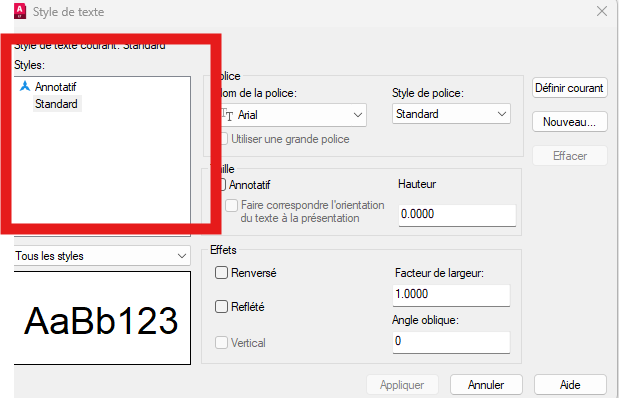
Next, the plugin analyzes all text styles used in the DWG.
It checks Model Space and internal block content to identify every font currently in use.Complete inspection of all AutoCAD text styles. Replace fonts with Arial
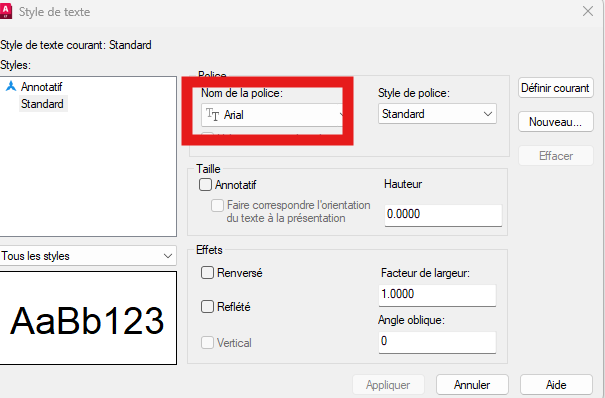
Then, every detected font is replaced with Arial.
This ensures consistency across the drawing and removes any dependency on external font files.All text styles now use Arial. Visual impact on text
After switching to Arial, some text may slightly shift in size or alignment.
This is normal because different fonts do not occupy space the same way.Minor visual adjustments may occur after the conversion. Saving the updated DWG
Finally, the DWG is saved with all fonts standardized to Arial.
The drawing becomes cleaner, more portable, and ready for printing or delivery.The final file is saved with Arial applied everywhere.

Why force all fonts to Arial?
Enforcing a single font improves visual consistency and avoids missing or incompatible fonts when
sharing DWG files. Using AutoCAD force font to Arial also simplifies printing, enhances
readability, and eliminates rendering differences between workstations.